MISP Feed Generator



📚 Documentation 💠 Hub 💬 Discourse
This Remediation Component generates MISP Feed from CrowdSec decisions. It exposes this Feed over HTTP/S. This can be used to feed CrowdSec decisions to MISP using the "Feeds" functionality of MISP.
Quick Start
Installation using pip
Make sure you've Python 3.6+ installed. Using virtualenv is recommended. Run the following command to install the feed generator.
pip install crowdsec-misp-feed-generator
Installation using docker:
Refer to docker hub docs
Configuration
Run the following command to generate the base configuration file:
crowdsec-misp-feed-generator -g > crowdsec-misp-feed-generator.yaml
This will generate a configuration file named crowdsec-misp-feed-generator.yaml in the current directory.
You need to edit this file to configure the feed generator. Make sure you give the correct LAPI key and URL. You can generate a LAPI key using the following command on the machine with CrowdSec installed.
cscli bouncers add crowdsec-misp-feed-generator
Please refer to configuration reference section for more details on the configuration options.
Running the feed generator
After configuring the feed generator, you can run it using the following command:
crowdsec-misp-feed-generator -c crowdsec-misp-feed-generator.yaml
This will start the feed generator and expose the feed over HTTP/S, on the configured port and address.
Setting MISP to use the feed
You can now configure MISP to use this feed. To do this:
- Navigate to the "Feeds" tab in MISP.
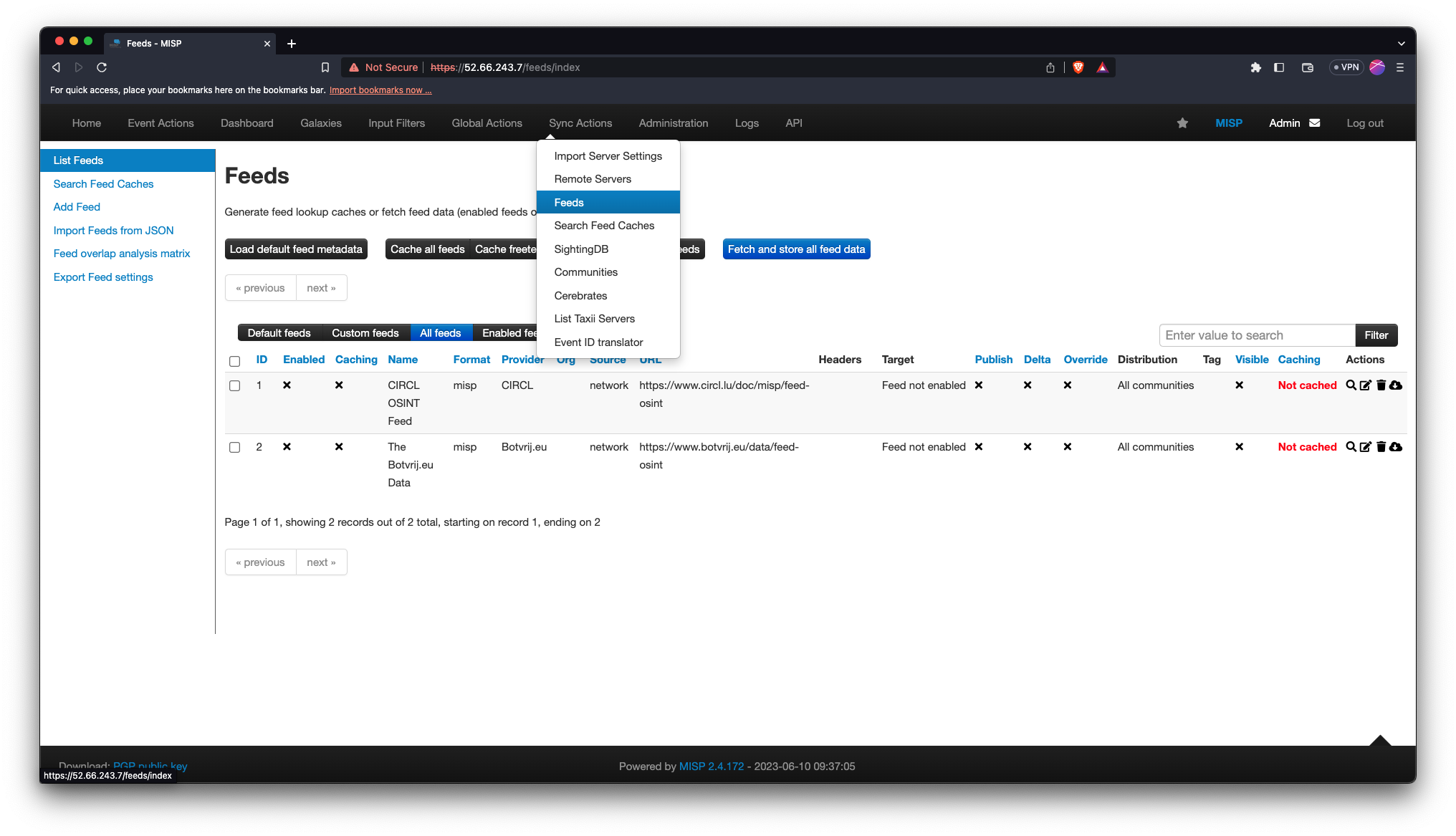
- Click on the "Add Feed" button.
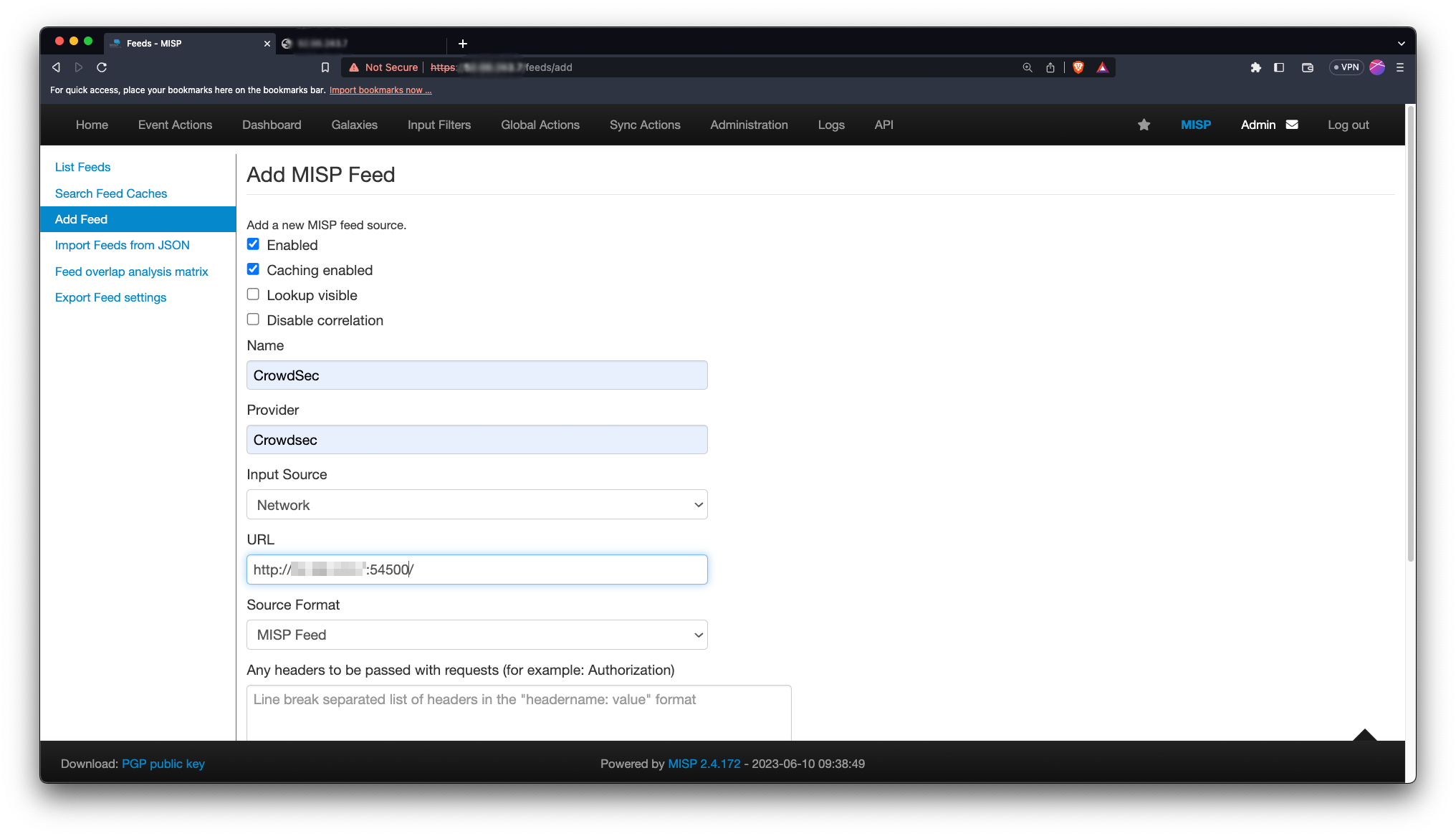
Fill the form with appropriate details. Don't forget to set the authentication if you've enabled it in the feed generator configuration.
- That's it! You can now use the feed in MISP. You can test it by clicking on the "Fetch now" button in the actions column. Few events should be added to MISP.
Configuration Reference
# CrowdSec Config
crowdsec_lapi_url: http://localhost:8080/
crowdsec_lapi_key: <your-lapi-key>
crowdsec_update_frequency: 1m
include_scenarios_containing: [] # ignore IPs banned for triggering scenarios not containing either of provided word, eg ["ssh", "http"]
exclude_scenarios_containing: [] # ignore IPs banned for triggering scenarios containing either of provided word
only_include_decisions_from: [] # only include IPs banned due to decisions orginating from provided sources. eg value ["cscli", "crowdsec"]

# MISP Config
misp_feed_reset_frequency: 1w
misp_event_analysis_level: 2
misp_feed_orgc:
  name: CrowdSec
  uuid: 5f6e7b5a-6b1a-4c0e-8a3c-9b9c5a474e8c

misp_feed_threat_level_id: 4
misp_feed_published: false
misp_feed_tags: []

# Component Config

output_dir: ./crowdsec-misp-feed/

# Component Server Config
listen_addr: 0.0.0.0
listen_port: 2450
tls:
  enabled: false
  cert_file: ""
  key_file: ""

basic_auth:
  enabled: false
  username: ""
  password: ""

# Log Config
log_level: info # debug, info, warning, error
log_mode: stdout # stdout, stderr, file
crowdsec_lapi_url
string
The URL of CrowdSec LAPI. It should be accessible from the component.
crowdsec_lapi_key
string
It can be obtained by running the following on the machine CrowdSec LAPI is deployed on.
sudo cscli -oraw bouncers add misp-feed-generator # -oraw flag can discarded for human friendly output.
crowdsec_update_frequency
string
The component will poll the CrowdSec every update_frequency interval.
Value can be in seconds (eg 30s), minutes (eg 5m), hours (eg 1h), days (eg 1d), weeks (eg 1w), months (eg 1M) or years (eg 1y).
include_scenarios_containing
[ ]string
Ignore IPs banned for triggering scenarios not containing either of provided word.
include_scenarios_containing: ["ssh", "http"]
exclude_scenarios_containing
[ ]string
Ignore IPs banned for triggering scenarios containing either of provided word.
exclude_scenarios_containing: ["ssh", "http"]
only_include_decisions_from
[ ]string
Only include IPs banned due to decisions orginating from provided sources.
only_include_decisions_from: ["cscli", "crowdsec"]
misp_feed_reset_frequency
string
The component will reset the feed every misp_feed_reset_frequency interval.
Value can be in seconds (eg 30s), minutes (eg 5m), hours (eg 1h), days (eg 1d), weeks (eg 1w), months (eg 1M) or years (eg 1y).
misp_event_analysis_level
int
The analysis level of the events generated. Refer to MISP docs for more details.
misp_feed_orgc
object
The author organisation of the feed.
misp_feed_orgc:
  name: CrowdSec
  uuid: 5f6e7b5a-6b1a-4c0e-8a3c-9b9c5a474e8c
name
string
The name of author organisation of the feed.
uuid
string
The UUID of author organisation of the feed.
misp_feed_threat_level_id
int
The threat level of the feed. Refer to MISP docs.
misp_feed_threat_level_id: 4
misp_feed_published
boolean
Whether the feed is published or not. Refer to MISP docs.
misp_feed_published: false
misp_feed_tags
[ ]object
The tags to be added to the events generated by the feed. Refer to MISP docs.
misp_feed_tags: [{"exportable": true,"colour": "#ffffff","name": "tlp:white","id": "2" }]
output_dir: ./crowdsec-misp-feed/
listen_addr
string
The address to listen on for serving the feed.
listen_addr: "0.0.0.0"
listen_port
string
The port to listen on for serving the feed.
listen_port: 2450
tls
object
TLS configuration for serving the feed.
tls:
  enabled: false
  cert_file: "/etc/ssl/certs/crowdsec-misp-feed-generator.crt"
  key_file: "/etc/ssl/private/crowdsec-misp-feed-generator.key"
enabled
boolean
Whether to enable TLS for serving the feed.
cert_file
string (path to file)
The path to the certificate file.
key_file
string (path to file)
The path to the key file.
basic_auth
object
Basic authentication configuration for serving the feed.
basic_auth:
  enabled: false
  username: ""
  password: ""
enabled
boolean
Whether to enable basic authentication for serving the feed.
username
string
Username for basic authentication.
basic_auth:
  username: "crowdsec"
password
string
Password for basic authentication.
basic_auth:
  password: "myh@rdt0gu3sspassw0rd"
log_level
debug | info | warning | error
The log level for the component.
log_level: info
log_mode
stdout | stderr | file
The log mode for the component.